
Importing MIDI Files into Tabledit
1. Open up Tabledit.exe (This is for version 2.64).
2. Choose File/New and select Banjo Open G.
3. If you know that the tab is in a different tuning, select Score/instrument/tuning,
and change the tuning as required. If the instrument in the original MIDI file
was tabbed with a virtual capo, a possible feature in Tabledit, then the file
you have set up to import the MIDI will have to be capoed also. You may have
to experiment with the import, trying it several times, before you can determine
the correct combination of tuning and capo. Hit the "Apply" button
and the "OK" button to get back to the main window.
4. Open File/Import/Import MIDI,NIFF... which opens a file open dialog window.
Open the folder where you have placed the MIDI file, and select the file and
click the "Open" button. This will open up the "Import MIDI,
NIFF" Dialog box. The individual tracks will show in the display. You can
highlight just the banjo track, or check the "Tracks" box to select
them all. If you select multiple tracks, make sure you click the raidal button
labeled "To Separate Tracks." Then click the "Import" button
to complete the process. Your imported tab should now appear in the window.
For some reason, if the banjo instrument in the original Tabledit/MIDI file
has a virtual capo as part of the tuning scheme, I have only been able to successfully
import if I am importing the banjo track only.
There is, of course, still a problem to be overcome. If the note in the MIDI file is not on an open string, then Tabledit assigns the note to an equivalent string and fret based upon its own programming algorythm. Unfortunately, this assignment is not always accurate, but in most cases, it is not difficult to deduce where the note should properly be located. As an example, let's look at a couple of measures from the MIDI file from the Fretted Instruments School webpage for Banjo in the Hollow, the Doug Dillard tune that is basically a variation of Cripple Creek. The tune is in open G tuning. In measure 2, Tabledit interpreted the MIDI file as follows:
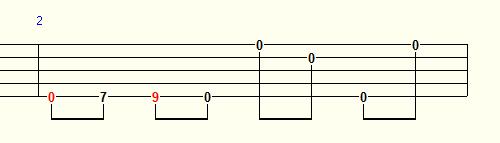
Of course, the first four notes would not be played in linear fashion on the fifth string. In fact, this is an often used melodic style phrase that stretches the scale fragment across the 5th, 2nd and 1st strings, so that each of the notes can ring out properly without being dampened by a preceding note. The edited 2nd measure is as thus:
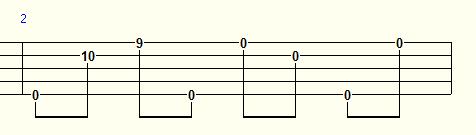
The third measure also needs some adjustment, in a similar fashion. Tabledit displays that measure as follows:
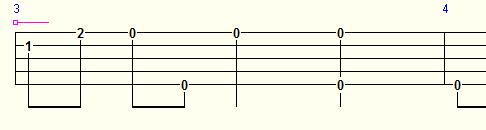
It is not typical in bluegrss style, though not entirely unheard of, for two eighth notes in a forward roll to be played in succession on the same string. However, by moving those first two notes, a partial C chord, to the 3rd and 2nd string, at the 5th fret, the right hand movement of the forward roll can be maintained, and what jumps out is another fairly conventional and often used melodic phrase.
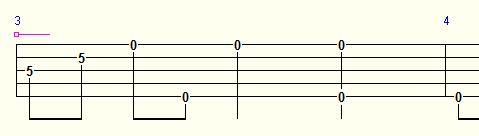
If you go through the entire imported tablature in the same manner, you can identify and edit other places where the tab needs adjusting in short order.